UPDATE: With the recent release of BT5r3 i suggest that you use this script here to update the system: BT5 r3 new build details
Note with the new BT5r2 release this script has not yet been tested, please only use this script on BT5r1 or earlier until we can confirm that it works on BT5r2 without any issues. Until then most of the fixes for BT5r2 are in this post.
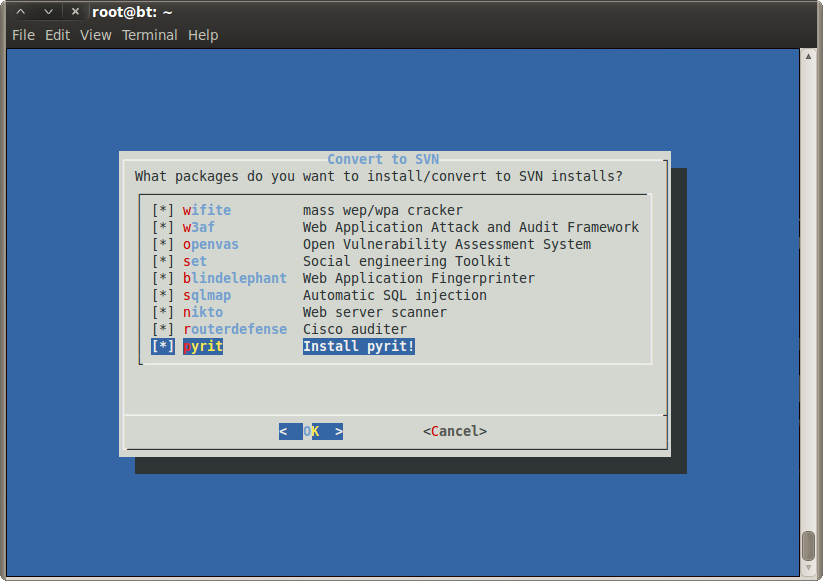
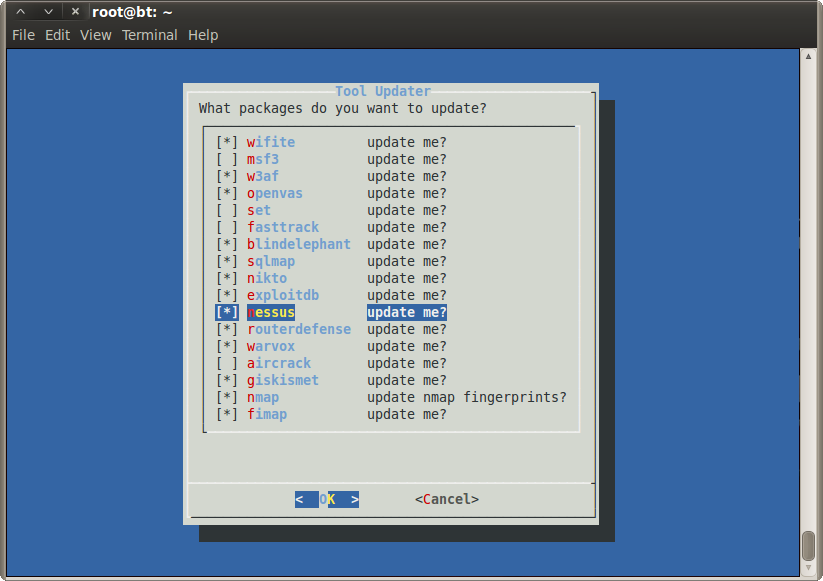
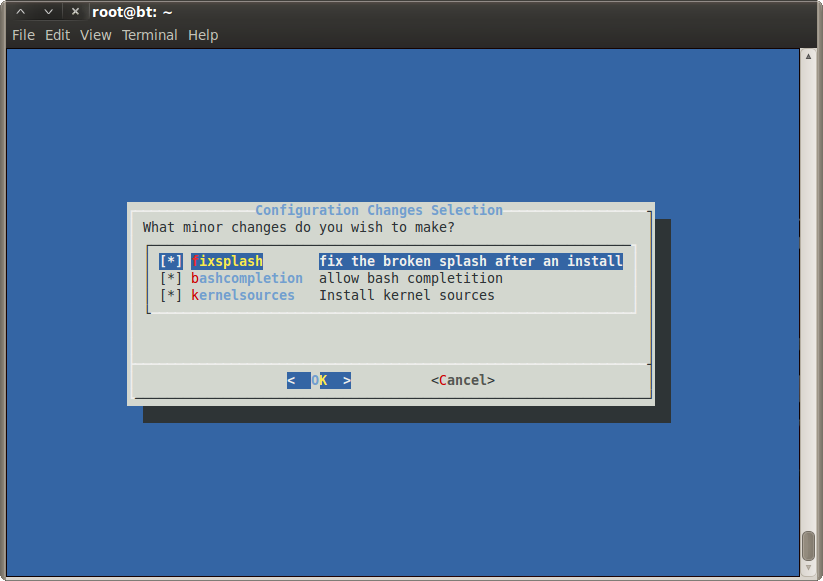
Are you using BT5-Gnome and find that many of the tools are either missing or out of date? If the answer is yes then use this bt5-fixit.sh script to add many missing tools and replace the installed tools with their svn counter parts.
Just a few of the many tools that are missing that this script gives you the option to add:
RDP client, netwox, netsed, calculator, ssh-keys, missing drivers, arp-scan, gnomeVNC server, UbuntuFirewall, p7zip, screen, file-roller, wifite, open-vas, pyrite…. the list goes on!
To download
either use svn: svn checkout http://bt5-fixit.googlecode.com/svn/trunk/ bt5-fixit
or go to the Google Code Page
1 2 3 4 5 6 7 8 9 10 11 12 13 14 15 16 17 18 19 20 21 22 23 24 25 26 27 28 29 30 31 32 33 34 35 36 37 38 39 | version="2.5" #Nov/2011 # Changelog: # v2.5 - Added many new fixes by recommendations of Michael Haberland (see below) # Fixed pulseaudio so that sound now works by default # Installed latest version of ophcrack v3.3.1 # Added apt alias for apt-get like in Mint # Added option to auto login as root # Added option to auto startx after root login # Improved gnome-network-manager installation # Fixed metasploit updater # Added UPX-packing and signature stealing to fast-track # v2.4 - Fixed framework3 to now be framework and turned nmap fingers to default to off # v2.3 - Fixed an issue with Google PGP key import & SQLMap installation # v2.2 - Plenty of spelling mistakes now fixed. Cheers Rich Hicks # v2.1 - Added version 7.0 of hydra (and xhydra) # v2.0 - Added meld program (quick visual diff between 2/3 files) # v1.9 - Added tree command # v1.8 - Added cisco-decrypt tool for pcf encrypred passwords (cisco client vpn) # - Added arduino, teensy and teensyduino # - Added missing tiger, creepy and arduino to install options # v1.7 - Added tsclient, moved dropbox location and changed default option to No # v1.6.1 - Fixed slight mistake in latest addition, Whoops! # v1.6 - Added tiger, creepy, netwox and arduino. Added sshkey and wicd configuration # v1.5 - Added deluge bittorent client and jockey-gtk for driver installations # v1.4 - BRUTEFORCE recommended adding the following: # removal of istall icon # changing of password # addition of mono, recordmydesktop and terminator # ability to install dropbox # removal of i_set option # added apt-get autoremove to end of sections to clean up # v1.3 - Added clear after diaog and changes openvas setup message # v1.2 - Added mz, scapy, FernWifiCracker # v1.1 - Added -u flag to allow skipping to updates function # v1.0 - Official Release # v0.4 - Cleaned up and added TUI checklist # v0.3 - Added nipper, fwbuilder and routerdefense # v0.2 - Clean with more missing apps # v0.1 - First release |
When you run it the first time you need to install the extra repositories, without them most of the tools will not install/update.
If you have any recommendations or requests please let me know by leaving a comment using the form below. I’ll try to update the script as quickly as I can for others.
Cheers


Even though my firefox works fine from with in backtrack VM, the script fails as it could not detect the Net connection!!
When i check the code the interval for pinging google is set at 1000. I tested with 10 and the script worked fine. Just wanted to let you know
Started testing on BT5r2… Let’s share what is fixed and what is still applicable.
configuration_stuff(): all fixes valid for this version as well.
Will update again soon.
Hello Phillips
Another thing I noticed, alongside with changing the root password in the first step with passwd, I think that the MySQL’s root password should also change accordingly.
Sounds good, feel free to make the changes to code as you’re now should be able to. Let me know if you have any issues. Cheers
First, thank you for this outstanding update script! The script executes fine, I am not sure if it is related but it would appear it might break W3AF. I am not longer able to launch the console or the GUI, it just close with no error.
Any idea?
Thanks,
Stephan
Are you running the latest version of the script? version 3.0 (r42) contains a fix for w3af.
The new install is as follows:
2
3
4
5
6
7
8
9
10
11
12
13
14
15
cp /usr/share/applications/backtrack-w3af-console.desktop /tmp/.
cp /usr/share/app-install/desktop/w3af.desktop /tmp/.
apt-get purge -y w3af
cd /pentest/web
svn co https://w3af.svn.sourceforge.net/svnroot/w3af/trunk w3af
cp /tmp/backtrack-w3af-gui.desktop /usr/share/applications/.
cp /tmp/backtrack-w3af-console.desktop /usr/share/applications/.
cp /tmp/w3af.desktop /usr/share/applications/. ;
apt-get -y install python-nltk python-soappy python-lxml python-svn python2.6-dev
wget http://pypi.python.org/packages/source/p/pybloomfiltermmap/pybloomfiltermmap-0.2.0.tar.gz
git clone git://github.com/axiak/pybloomfiltermmap.git /tmp/pybloomfiltermmap
cd /tmp/pybloomfiltermmap
python setup.py install
cd -
Thanks for this great script. I ran the updates and installs without a problem. But now my wifi will not connect. Every time I try to connect it comes back with a ‘bad password’ error. The connection was fine before the update.
Any ideas out there about what happened?
Thanks in advance.
This was potentially caused by compiling the 32bit drivers for a 64bit OS, are you using a 64bit OS?
For now disable the following option when installing:
missing-drivers “allows easy install of nVidia, AMD and Wireless Drivers” OFF
I was wondering if you had a fix, or could implement a fix, for bt5-fixit so that it won’t break my wifi on my laptop for 64-bit BT5R1? I ran the bt5-fixit script with the option for correcting/updating wicd first, and when it got to the point of correcting/updating wicd my wireless had dropped its connection and I could not get connected again to any connection, be unencrypted, WEP, WPA, or WPA2.
I then tried to run the script after re-installing BT5R1 64-bit not selecting wicd this time, but when the script got past the screen for selecting wicd to correct/update my connection was still dropped/broke.
From my reading it seems as this is just an issue with 64-bit machines, but not sure, haven’t been able to find a lot of information on it.
Thank you for the great script none-the-less, it is a work of art if I may say so myself phillips321
This was potentially caused by compiling the 32bit drivers for a 64bit OS.
For now disable the following option when installing:
missing-drivers “allows easy install of nVidia, AMD and Wireless Drivers” OFF
Hope this helps for now.
I’ll look to getting this sorted ASAP.
There’s some typo error in this script in:
i_routerdefense() { svn checkout http://routerdefense.googlecode.com/svn/trunk/
/vaw/www/routerdefense ;}
u_routerdefense() { svn up /vaw/www/routerdefense/ ;}
Instead of vaw it should be var
lol, cheers for this. this can go down on my monkey points list! Fixed in version 3.0 (r41)
Hello phillips, how are you?
Just so you know, the opera launchpad repo/package gives an error when apt-get updating.
Also, w3af does not work out of the box. I don’t know if this is due to the changes because of your script, but it needs some more packages/work. I will write you the snippet to add it immediately after installing it.
Lastly, by all means change “Bruteforce” to “Ion” in your script’s changelog
w3af (AFTER installing it through bt4-fixit.sh):
apt-get install python-nltk python-soappy python-lxml python-svn
wget http://pypi.python.org/packages/source/p/pybloomfiltermmap/pybloomfiltermmap-0.2.0.tar.gz
tar -zxpvf pybloomfiltermmap-0.2.0.tar.gz
cd pybloomfiltermmap-0.2.0
apt-get install python2.6-dev
python setup.py install
And then you can actually start w3af.
Also, another thing. Nessus is not installed by default on BT5r1. I think this is mostly for support to the open source OpenVAS. Anyway you should add it to the script, it’s as simple as a “apt-get install nessus”.
Forgot to add rm and rm -rf for the pybloomfiltermmap-0.2.0 package and directory.
Ok, added this but why version 0.2.0 when version 0.3.2 is out?
https://github.com/axiak/pybloomfiltermmap/blob/master/CHANGELOG
Ok, just tested with version 0.3.2 and it works fine so i have used a git clone into tmp and built from this. Thanks for the fixes
Forgot to add rm and rm -rf for the pybloomfiltermmap-0.2.0 package and directory.
Also, THC have just released a new version of hydra. If you get and compile manually, you might want to update your links in the script (although it was made available in the BT repos).
Also, for Adobe Reader (latest version 9.4.7):
wget ftp://ftp.adobe.com/pub/adobe/reader/unix/9.x/9.4.7/enu/AdbeRdr9.4.7-1_i486linux_enu.bin
chmod +x AdbeRdr9.4.7-1_i486linux_enu.bin
./AdbeRdr9.4.7-1_i486linux_enu.bin
Removed the hydra compile and now using bt5 repo as it’s at latest version (7.2) cheers for this
Hello phillips. When running the script with the update flag I get the following error:
###############################################
Now updating: warvox
###############################################
svn: Repository moved temporarily to ‘http://www.metasploit.com/svn/warvox/trunk’; please relocate
Just so you know.
Cheers for this, ill keep an eye on it to see when it reverts back to the original svn path
how do I use this????
it only shows this:
root@bt:~# svn checkout http://bt5-fixit.googlecode.com/svn/trunk/ bt5-fixit
Checked out revision 39.
cd into the folder created and then type ./bt5-fixit.sh
Then jut follow the onscreen instructions.
Very nice work!!! Congratulations!!!
Just wanted to say thank you for writing such a terrific script. I’m accustomed to badly maintained scripts, installers throwing errors, and spending hours doing repairs. Bt5-fixit executed smooth as glass. The only errors I encountered were my own and even they were easily recoverable.
So, thank you again!
Cheers for the response, great to here that people use the script. If you ever have recommendations for it please let me know. Many thanks
Hello it’s me again to share some extra PPAs that I included to install new software versions, if you find them usefull feel free to add in a future script version.
———————
add-apt-repository ppa:deluge-team/ppa
apt-get install deluge
———————
add-apt-repository ppa:gnome-terminator/ppa
apt-get install terminator
———————
add-apt-repository ppa:mozillateam/firefox-stable
apt-get install firefox
———————
add-apt-repository ppa:nilarimogard/webupd8
apt-get install mono-devel mono-runtime parcellite launchpad-getkeys
———————
filezilla nautilus-dropbox unetbootin
echo “deb http://archive.getdeb.net/ubuntu lucid-getdeb apps #GetDeb Software Portal” >> /etc/apt/sources.list.d/getdeb.list
wget -q -O- http://archive.getdeb.net/getdeb-archive.key | sudo apt-key add -
———————
Description
launchpad-getkeys search and installs missing ppa keys.
unetbootin creates boot usb key.
parcellite manages clipboard.
The rest is just update.
Cheer.
The last command should be:
echo “deb http://archive.getdeb.net/ubuntu lucid-getdeb apps #GetDeb Software Portal” >> /etc/apt/sources.list.d/getdeb.list
wget -q -O- http://archive.getdeb.net/getdeb-archive.key | sudo apt-key add -
apt-get install filezilla nautilus-dropbox unetbootin
And if some new user wants to add these ppas manualy, before every ‘apt-get install’ it needs, of course, a ‘apt-get update’.
Changes made in v2.7 (revision r37) thanks for the pointers
For some reason the ppa:mozillateam/firefox-stable signing key throws an error when apt-get updating. You might want to look at that.
PS. At some point I guess all this can become a mainterner’s hell. I hope you’ll still have time to support it
Making changes doesn’t take much time at all, just The testing of the changes adds up. You’ve mad plenty of useful recommendations, fancy editing the code directly? Do you have a google account I could add directly to the code so you can commit changes? Cheers again
Hello Phillips, would be cool, thanks. You can use the email I enter in this comment. I already have another tool in my mind. Cheers.
PS. I have added you on twitter as well.
I wonder if you could add a script that starts networking and wicd by default. I Contacted the Devs of BT 5 and they said that if an ethernet cord is plugged in then BT will NOT start networking to protect against attacks during boot when the system is vulnerable, so i wonder if you could make some sort of startup script that runs when X starts with the command “/etc/init.d/networking start” and that also starts WICD. It annoys the hell out of me that i have to type that into the terminal after starting X every time…
If you want to start networking by default ensure when you run the script that you tick gnome-network-manager. This is better intergated into the gnome desktop and manages both normal wired ethernet as well as wireless networks. It also has options for 3G networking and VPN connections. Once you have settings installed it will auto start and connect to wireless acccess points. Hope this helps
Congrats for this great script.
Just a few comments. You can remove the line:
add-apt-repository ppa:sevenmachines/flash
Since it’s no longer supported.
And I didn’t understand why using:
http://packages.fwbuilder.org/deb/stable/ maverick contrib
Instead of:
http://packages.fwbuilder.org/deb/stable/ lucid contrib
Since it’s the same version.
Cheers
Cool, will look into adding these changes to the script. Thanks
Another useful tool, this one for web services testing “SoapUI”. available here: http://sourceforge.net/projects/soapui/files/soapui/4.0.1/soapUI-x32-4_0_1.sh/download
And if you didnt find it, XSSF is available here: https://code.google.com/p/xssf/
Thanks for your efforts
Very good in BT5-R1
Works fine with BT5 R1!
Only one error, in line 437:
u_msf3() { /pentest/exploits/framework3/msfupdate ; }
framework3 should change to just ‘framework’.
I use Gnacktrack 6 if it is sufficiently stable, and how to affairs of bugs in it
Is it compatible with BackTrack 5R1?
Works with BT5 Gnome R1 just fine
not sure if its in MSF4, but the XSSF module for metasploit would be awesome. cheers, nice work
I havent played with that feature. Do you mena this one here: http://dev.metasploit.com/redmine/issues/2995
If so i can surely add it to the code.
Thats the one… It still isn’t included by default
I installed the BT5 installation for Android, and noticed that it is missing quite a lot. I tried to use your script, but after running it, I get an error: ./bt5-fixit.sh: line372: syntax error near unexpected token ‘{apt-get i_tiger(){apt-get install -y tiger ;}
How can I get around this?
Okay, thanks for this. There was a minor bug in the code with the auto yes feature of apt-get. It’s now been fixed as of version 1.6.1 (revision r13).
Cheers
And another tool worth installing is tiger: http://www.nongnu.org/tiger/
It’s in the repos, apt-get install tiger
tiger has now been added
Hello once again.
Here is another suggestion. If you have run wicd you should have noticed the error message that pops up everytimg about wicd’s D-Bus interface. This is how to remove it.
BEFORE STARTING WICD, you should run:
dpkg-reconfigure wicd
update-rc.d wicd defaults
Also, it would be good for the script to autogenerate the sshd keys, because newbies don’t have any idea how to set up ssh access:
sshd-generate
That’s it and you’re ready to connect through SSH.
Also, I should mention again that creepy (apt-get install creepy) is a nice tool that I suggested above, but you forgot it or otherwise decided not to include. Any reason for that?
creepy has now been added,
good tip about ssh keys, added.
wicd config has also been added.
cheers again for the good tips.
THANK YOU, that’s a very useful script!
I tryed it without any option on a plain vanilla BT5 Gnome VM, and it broke framework3 installation.
However it may be nice to upgrade to FW4.
Cheers,
Piero
Any chance you can provide more info on how framework3 update broke please?
Many thanks
Hello Phillips, another suggestion is to add jockey-gtk for 3rd party drivers: http://packages.ubuntu.com/hardy/jockey-gtk
Also, a torrent client should be added, preferably Deluge.
Another suggestion for security tool: creepy (apt-get install creepy), http://downloadsquad.switched.com/2011/02/25/creepy-app-uses-twitter-and-flickr-data-to-track-anyone-on-a-map/ and http://ilektrojohn.github.com/creepy/
done in v1.5, cheers for another good recommendation
You forgot creepy though
:?:
Another thing is the double entry of WBarConf in the Applications–>Accessories menu. You could also remove the second one.
And lastly, you could check if the script is run as root, just to be sure:
if [ "`whoami`" != "root" ]; then
echo “Run as root please. Exiting…” && exit 1
fi
Now you should really combine the above comments
Sorry for flooding your post
added rootcheck function
any ideas how to remove the WBarConf icon with a script?
I would also like to add an startup application for pulseaudio with a script.
Any ideas?
The menu items are supposed to be at /etc/xdg/menus/applications.menu but I’m not able to find the entry in question
You could also apt-get autoremove some left-over packages. Sorry for the many comments, combine them if you want.
added apt-get -y clean ; apt-get -y autoremove
The installer for SET also throws an error (i_set), it doesn’t exist.
fixed, (removed option)
Hello again Phillips321, I really like your script, here are some suggestions:
a) Option to change the root password: passwd
b) Option to remove the Install Backtrack icon from Desktop: if [ -f /root/Desktop/backtrack-install.desktop ]; then
rm /root/Desktop/backtrack-install.desktop
fi
c) Option to add Dropbox:
if [ "`dpkg -s nautilus-dropbox | grep Status`" != "Status: install ok installed" ]; then
wget -N http://linux.dropbox.com/packages/nautilus-dropbox_0.6.8_i386.deb
dpkg -i nautilus-dropbox_0.6.8_i386.deb
nautilus –quit #restart nautilus
dropbox start -i #run gui installer
read -e -p “Please complete the installation and then press Enter to continue…”
dropbox autostart y #already by default, just to be sure
rm nautilus-dropbox_0.6.8_i386.deb
fi
d) Add some more packages: mono-runtime, mono-devel, gtk-recordmydesktop, terminator
If anything else comes to mind I’ll throw another comment. Keep up the good work!
a> Good idea, any idea how to check if the password is currently set to “toor”
b> Another good idea, will be added
c> I’ll see if i can implement the dropbox option under the tool installs section.
d> Have added these to install menu
a> Not really, the passwords are stored in the shadow file (/etc/shadow). I have changed mine and from what I see the SHA512 salted algorithm is used. So, the only “solution” I see is to crack this I guess which in turn is not a solution… I guess you could create a dialog asking the user if he wants to change it (for the first-time run).
yeah though this so was thinking along a different root.
if [su root] fails with “toor”
then
passwd
fi
p.w. script has just been updated to svn on google code
diff
gcalctool is missing from BackTrack5. Please add it to the script.